# Consortium

## Introduction

A Consortium is a collection of Client Organizations that have the need to transact with one another. These are the organizations that form and join channels and that own peers.

## Configuration

Click the “+” button next to Consortia to add a Consortium.

<figure><img src="https://t-images.imgix.net/https%3A%2F%2Fapp-us-east-1.t-cdn.net%2F5f96e1a6e5864f172c21948d%2Fposts%2F61e5a1eb6e046257deed3616%2F61e5a1eb6e046257deed3616_74369.png?width=1240&#x26;w=1240&#x26;auto=format%2Ccompress&#x26;ixlib=js-2.3.1&#x26;s=db047ae49162fd420be5cdf5e7b96934" alt=""><figcaption></figcaption></figure>

<figure><img src="https://t-images.imgix.net/https%3A%2F%2Fapp-us-east-1.t-cdn.net%2F5f96e1a6e5864f172c21948d%2Fposts%2F61e5a1f681b8c53dc07d5c17%2F61e5a1f681b8c53dc07d5c17_11564.png?width=1240&#x26;w=1240&#x26;auto=format%2Ccompress&#x26;ixlib=js-2.3.1&#x26;s=a76df81c9e31d41f205af5f636fd0452" alt=""><figcaption></figcaption></figure>

<figure><img src="https://t-images.imgix.net/https%3A%2F%2Fapp-us-east-1.t-cdn.net%2F5f96e1a6e5864f172c21948d%2Fposts%2F61e5a2106e0462ca04ed3629%2F61e5a2106e0462ca04ed3629_61814.png?width=1240&#x26;w=1240&#x26;auto=format%2Ccompress&#x26;ixlib=js-2.3.1&#x26;s=3f926ff5e2fcbe351c486323a5495157" alt=""><figcaption></figcaption></figure>

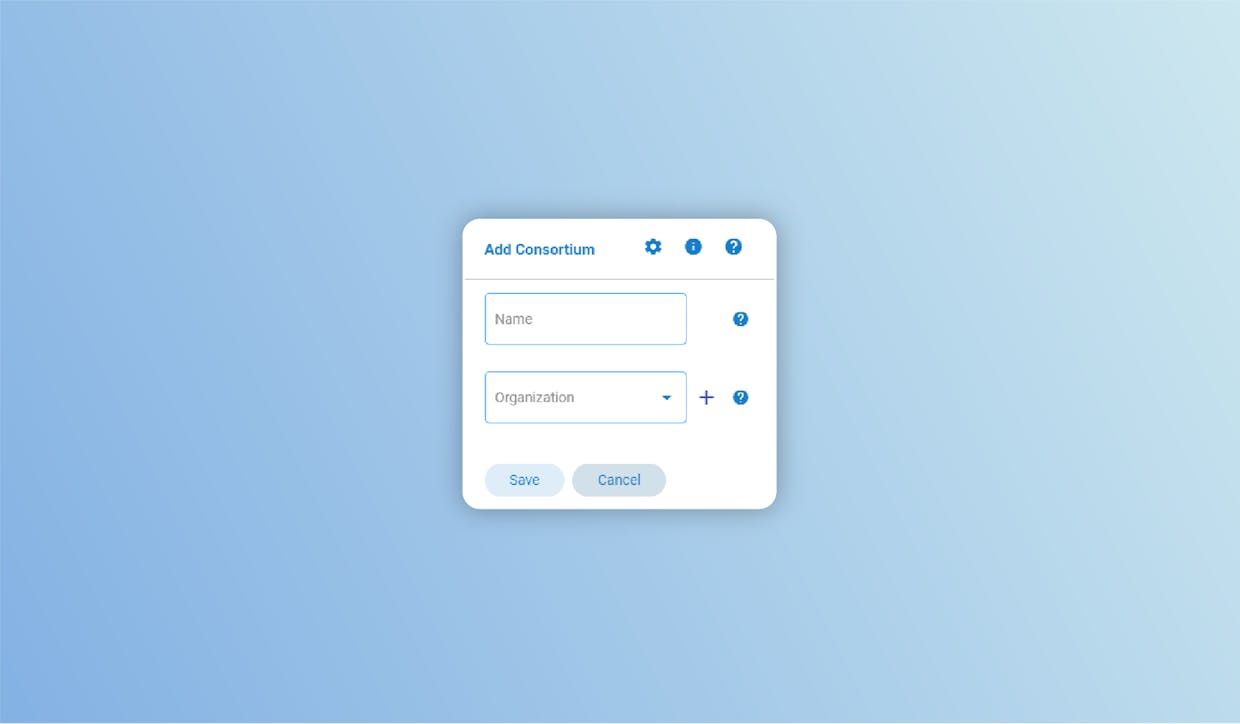
To configure it correctly you have to set:

* **Name**: give a name to your Consortium (Consortium Name must be set);
* **Members**: define which Organizations are part of this Consortium (Consortium Members must be set).

{% hint style="info" %}
Notes:

* The name assigned must always be unique. (Not case sensitive)
* Names must contain only alphanumeric characters or '\_' and be 20 characters at most.
  {% endhint %}

Now you can save your consortium and move forward with your project!


---

# Agent Instructions: Querying This Documentation

If you need additional information that is not directly available in this page, you can query the documentation dynamically by asking a question.

Perform an HTTP GET request on the current page URL with the `ask` query parameter:

```
GET https://docs.astrakode.tech/akb-wiki/astrakode-wiki/network-composer/components/consortium.md?ask=<question>
```

The question should be specific, self-contained, and written in natural language.
The response will contain a direct answer to the question and relevant excerpts and sources from the documentation.

Use this mechanism when the answer is not explicitly present in the current page, you need clarification or additional context, or you want to retrieve related documentation sections.